Data overload: which running stats should I actually care about?
A practical way to separate progress checks from the numbers you enjoy sharing.
Published
For running progress, start with what you ran, how long it took and how hard it felt. Compare similar outings over time. For fun, enjoy the fastest moment, the highest cadence or the biggest power number, provided you understand what was recorded. A stat can make a good story without becoming your next training target.
A completed run can leave you with more numbers than you had minutes to look at them. Pace, power, cadence, stride length, ground contact, heart rate: each describes something, but you do not need to turn every screen into homework. Decide what you want to learn from this run first.
Which running stats are worth following for progress?
My starting point would be a small training record: distance or duration, the kind of session, and a short note on effort. “Recovery run, comfortable conversation, windy on the way home” gives a pace number something to sit beside. Whether you followed the intended session matters more than collecting a record on every outing.
Effort does not have to be a proprietary score. The CDC describes perceived effort and the talk test as ways of judging relative intensity. Its examples are general activity guidance, rather than a personalised running plan. You can still record how breathing and effort felt alongside your watch data.
For a steady run, average pace may help answer whether a familiar route is feeling more comfortable at a similar effort. For repetitions, look at the relevant laps and recoveries. The average of the warm-up, faster work and jog home cannot describe each part separately. Our whole-session workout example shows why those slower minutes occupy so much of a run.
Choose the question before choosing the stat. This is an editorial guide, not a ranking of measurement accuracy.
- Did I do the run I intended?
- Session, time or distance, effortRead these together. A relaxed recovery run can be successful without a quick pace.
- What is changing over time?
- Comparable runs or lapsKeep route, effort, conditions and recording method in the comparison. One outing cannot establish a trend.
- What would be fun to share?
- Top pace, max cadence, max powerCheck that the peak makes sense, label it as a peak and keep the run's story attached.
Compare runs that deserve to be compared
Imagine a familiar 7.5km route taking 45 minutes: 6:00/km on average. A later outing takes 44 minutes, or about 5:52/km. That is a useful observation. Before declaring a fitness breakthrough, check whether the second run had the same stops, effort and conditions. These are fictional numbers to illustrate the comparison.
Even the time definition matters. Strava explains that moving and elapsed time differ, and that its race calculations use elapsed time. A stop for traffic can therefore change what two seemingly similar pace figures mean. Keep the same basis when checking your own trend.
You can add heart rate if you find it useful, but establish that the recording is plausible before analysing tiny changes. Garmin's optical heart-rate guidance includes device fit and the correct activity profile. A neat chart cannot repair a poor recording.
What about top pace?
Top pace captures the fastest recorded pace, not the pace you sustained for the run. It can be a lovely reminder of a short acceleration. Check the trace if it claims something wildly out of character: Strava specifically warns that GPS errors can inflate maximum speed.
Keep the labels when sharing. “Top pace 3:20/km during the final strides” tells a different story from presenting 3:20/km as the pace of a 45-minute outing. A fastest split supplies another kind of context, because it describes a distance segment rather than just a brief peak. Confirm whether that split is a mile or kilometre.
Max cadence and max power can be enjoyable too
Cadence counts steps per minute across both feet. Maximum cadence is the highest recorded step rate; it does not describe the rhythm of the whole session. Enjoy a quick-feet moment without adopting its number as the rate every recovery run should reach.
Running power needs its source attached. Garmin's explanation of its power calculation describes a model using inputs such as speed, elevation and runner weight. A watch's maximum running power is a modelled peak, not a direct measurement of how powerful your shoes are. Keep the device, source and settings consistent when making your own comparisons.
Let the card be the fun part
Cinda Cards can put the shoes you wore beside up to four supported stats. Top pace, max cadence and max power are all available when those values are present. You supply up to three screenshots from a completed run, check the extracted values and download or share the image. The public tool does not need an account.
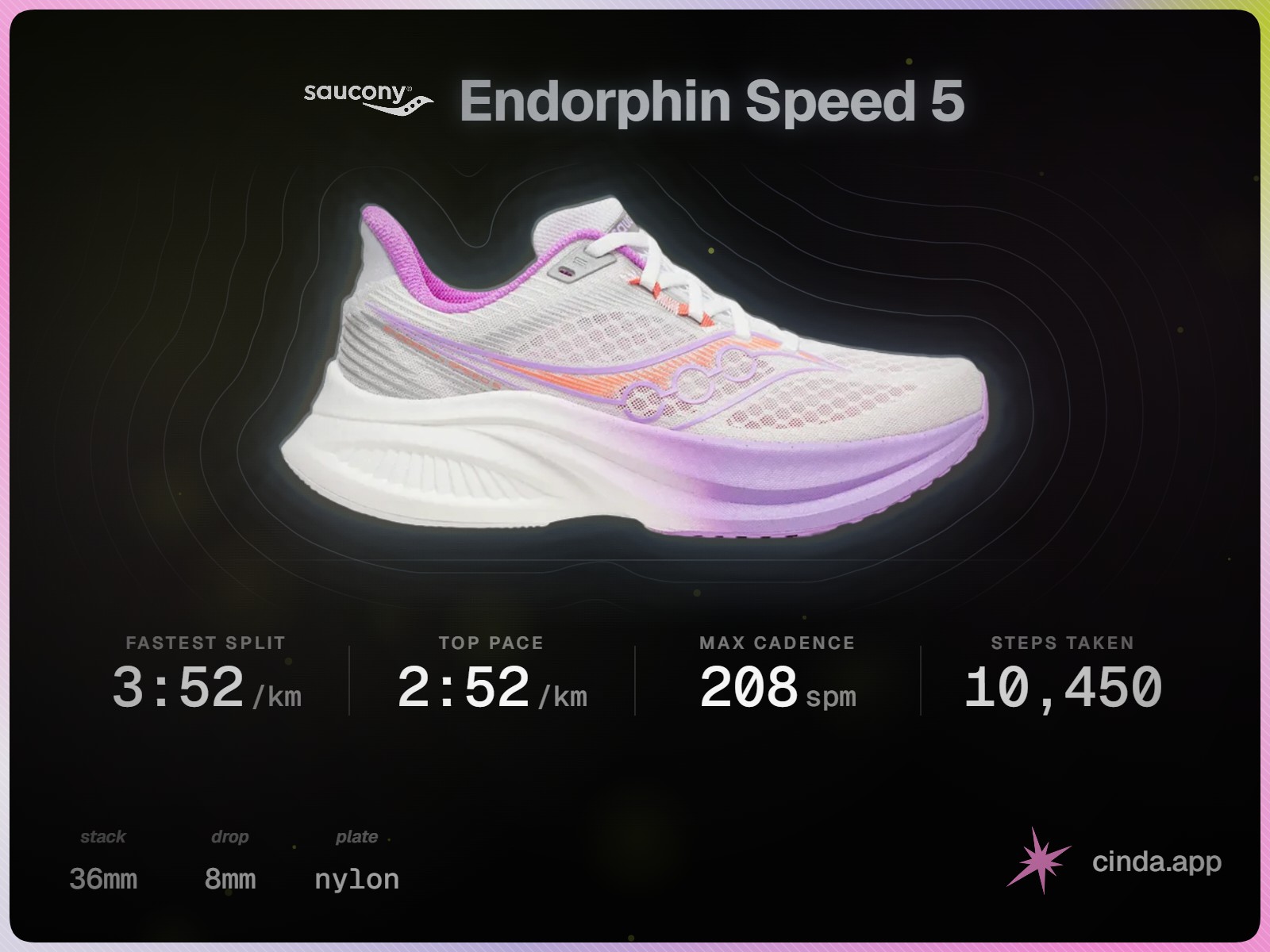
The card is a choice about presentation. It does not verify your watch's readings or establish that the pictured shoe caused them. Choose numbers you can explain, keep the units, and add a caption about the run. Our screenshot-to-card guide covers the steps and privacy considerations.
Your training record can hold the detail that the card leaves out. Cards currently focuses on shoe-related stats; it does not put distance, duration, elevation or heart rate on the card. There is no need to force your entire training analysis into a share image.
For the next run, keep the job clear too. Cinda can help choose from your rotation for Recovery, Long, Workout, Race or Trail. Neither that choice nor your enjoyment of a run needs to depend on beating yesterday's maximum.